Please read all steps before navigating away from this page.
Purchase a Registration Code from the San Juan College Bookstore. Be sure to purchase the code for the Section you are registered. (For example, AUTE-110-1010 or AUTE-110-1020.)
Click the Enter Registration Code button on this page.
Click the Add to Cart button. Note the price is zero.
Click the View Cart button.
Click Proceed to Checkout button. The Registration Code is NOT a Coupon Code. Do NOT enter the Registration Code here. Wait until the Checkout page.
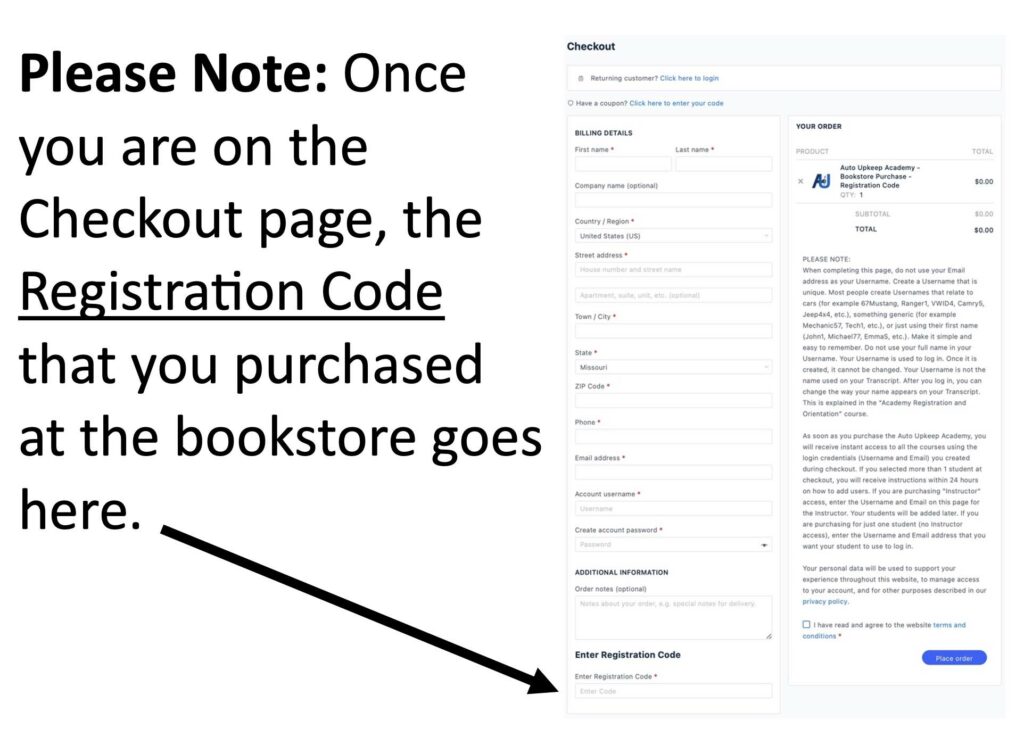
Find the Enter Registration Code box on the Checkout page and enter the Registration Code you obtained from the bookstore. (See image)
Complete Checkout. No credit card is required. The price is zero. The system will only let you checkout if you have a valid Registration Code from the Bookstore. If you have issues, please call 800-918-7323.
Click Start Academy Courses link.
Go to My Groups.
Click on your Group.
Click on Discussions.
Complete the Academy Registration and Orientation Course.
This website uses cookies to ensure you get the best experience on our website. By continuing to use this website, you accept the use of cookies and accept our Privacy Policy and Terms of Service.